
The Ultimate Crypto Security Checklist: How to Secure Your Wallet from Hackers
- The Hard Truth: If you leave your funds on an exchange, you do not own them. If your computer is infected with malware, your hot wallet is already compromised.
- The Golden Rule: Cold Storage (Hardware Wallets) is the only way to effectively air-gap your private keys from internet-based threats.
- The Weakest Link: It’s almost always YOU. Phishing attacks and poor password hygiene cause more losses than sophisticated code exploits.
- The Solution: Implement a “Zero Trust” architecture for your personal finance using this 13-step checklist.
The Paranoia Mindset: Why You Are a Target
In 2024 alone, billions of dollars were stolen from crypto users. You might think, “I only have $1,000, why would a hacker target me?”
Hackers use automated bots that scan the internet for vulnerabilities 24/7. They don’t care who you are; they care about your private keys. Whether you have $500 or $5,000,000, the attack vectors are the same.
Being your own bank offers financial freedom, but it comes with a terrifying responsibility: there is no customer support to call if you get hacked.
This guide is not just advice; it is a survival manual. We will move from basic hygiene to advanced “Fort Knox” level security protocols.
The Foundation – Hardware
1. Move Funds to Cold Storage – Non-Negotiable
If you take only one thing from this 2,000-word guide, let it be this: Buy a Hardware Wallet.
A “Hot Wallet” (like MetaMask, Trust Wallet, or an Exchange account) stores your private keys on a device connected to the internet. If you accidentally click a malicious link or download a virus, hackers can extract those keys and drain your funds in seconds.
A Hardware Wallet (Cold Storage) stores your keys on a physical chip that never touches the internet. Even if your computer is infected with the worst malware in the world, your keys remain safe inside the device. You physically press a button on the device to sign a transaction.
- Our Top Pick: Ledger Nano X (Best for mobile/Bluetooth).
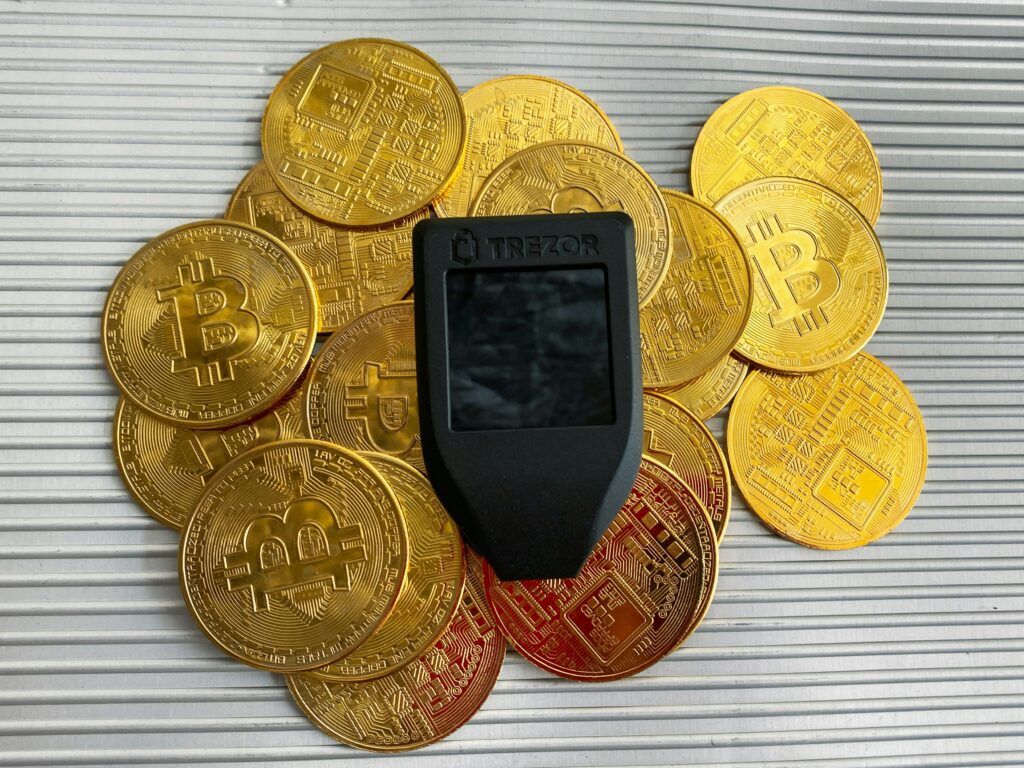
- Top Pick for Open Source: Trezor Model T (Best for auditability).
Still debating? Read our detailed battle: Ledger Nano X vs. Trezor Model T: Which Hardware Wallet is Safer?
Order a hardware wallet directly from the manufacturer today. Never buy one from Amazon or eBay (supply chain attacks are real).
Buy Ledger Nano X
2. Bulletproof Your Seed Phrase – Metal Storage
When you set up your wallet, you get a 12 or 24-word “Recovery Phrase.” This phrase IS your money. If your hardware wallet is destroyed, this phrase restores your funds. If a thief finds this phrase, they own your funds.
The Fatal Mistake: Writing it on a piece of paper and putting it in a drawer.
- Paper burns.
- Paper rots.
- Paper gets thrown out by mistake.
The Solution: Use a Steel Backup Wallet. These are indestructible metal plates where you slide in tiles or stamp your seed words. They are fireproof, waterproof, and shockproof.
Recommended Brands: Billfodl, Cryptosteel.
Transfer your paper seed phrase to steel and bury it in a secure location.
Advanced Seed Phrase Management
3. Shamir’s Secret and the 25th Word: Fort Knox Level Security
For investors dealing with substantial capital, even a steel plate with 24 words is not safe enough due to “single point of failure” risk (e.g., house fire, theft). Here, two advanced methods provide catastrophe protection:
The Passphrase: Hardware wallets (Ledger, Trezor) allow you to add a 25th word – a unique phrase you choose – in addition to the 24 generated words. This makes your wallet virtually invulnerable. If someone finds your 24-word steel plate, they cannot access your funds, as the 25th word is required. Without it, the wallet opens to a zero balance. This feature also allows you to create a “decoy wallet” with a small amount of crypto for plausible deniability under duress.
Shamir’s Secret Sharing: This cryptographic method allows you to break your recovery phrase into multiple distinct shares (e.g., 5 shares), where only a predetermined number of those shares (e.g., 3 out of 5) are required to reconstruct the seed. You can store these 5 shares in different locations (e.g., lawyer, family member, bank vault). This eliminates the single point of failure: if one share is lost or compromised, your funds remain safe. It is complex, but it is the gold standard for inheritance and disaster recovery.
Digital Hygiene – The Human Firewall
4. Kill SMS 2FA – Stop SIM Swapping
“SIM Swapping” is the most common way active traders get hacked.
- A hacker calls your phone carrier (Verizon, T-Mobile) pretending to be you.
- They convince the support agent to port your phone number to their SIM card.
- They initiate a “Forgot Password” on your Coinbase/Gmail account.
- The 2FA code is sent to their phone (since they stole your number).
- Game over.
The Fix: NEVER use SMS for Two-Factor Authentication.
Instead, use:
- Authenticator Apps: Google Authenticator or Authy (Better).
- Hardware Keys (Best): YubiKey. This is a physical USB key you must plug in to log in. It is un-phishable.
- Go to your Coinbase, Kraken, and Email settings right now and remove your phone number as a 2FA method. Enable Google Authenticator or YubiKey.
5. Use a Dedicated Email Address
Do not use your personal email for your crypto accounts. Your personal email is likely floating around in dozens of data breaches (check haveibeenpwned.com).
- Create a dedicated, encrypted email (e.g., ProtonMail) specifically for crypto.
- Do not use this email for anything else (no newsletters, no social media).
- If hackers don’t know your email exists, they can’t target it.
6. The “VPN Always On” Rule
When you trade crypto at a coffee shop or airport, you are using public WiFi. It is trivially easy for a hacker on the same network to intercept your traffic – “Man-in-the-Middle” attack.
Always use a VPN (Virtual Private Network). A VPN encrypts your internet traffic, making it unreadable to anyone watching the network.
- Recommended: NordVPN, ExpressVPN.
- Note: Avoid “Free VPNs” – they often sell your data.
Hardening the Digital Perimeter
7. Critical Exchange Setting: Whitelist Withdrawals
For trading funds kept on exchanges (critical for our Revenue Share partners like Coinbase and Kraken), this is the single most effective defense against post-login hacks.
- How it Works – You manually enter the addresses of your personal cold wallets (Ledger, Trezor) into the exchange settings. The exchange will only allow withdrawals to those approved addresses. Any attempt to send crypto to a new, unauthorized address requires a 24 to 48-hour cool-down period and an additional email confirmation.
- The Benefit – If a hacker breaches your account, they cannot instantly drain your funds. You have up to two days to realize the hack, log in, and lock the account before any funds can leave.
8. Essential Exchange Setting: Anti-Phishing Codes
Phishing is the art of deception. Hackers clone legitimate emails from Coinbase or Kraken perfectly.
Anti-Phishing Codes stop this deception immediately:
- You set a unique, secret word or phrase (e.g., “BLUEWHALE2025”) in your exchange security settings.
- The exchange will then include this code in every single legitimate email they send you.
- If you receive an email claiming to be from Coinbase and the secret phrase is missing, you know it is a fake/phishing attempt.
This is a zero-cost defense that provides an essential, personal security signature for your email communications.
Advanced OpSec – Smart Contracts & Isolation
9. Beware of Malicious Smart Contracts
If you use DeFi (Uniswap, OpenSea), you often have to “Approve” a token for trading. Many users mindlessly click “Approve Unlimited Spend.”
If that protocol gets hacked or turns out to be malicious, that “Unlimited Approval” gives the hacker permission to drain all of that specific token from your wallet, even without your Ledger connected.
- The Fix:
- Periodically use tools like Revoke.cash or Etherscan Token Approvals.
- Scan your wallet address to see which contracts have access to your funds.
- Revoke permissions for any old or suspicious contracts.
10. Segregate Your Funds – The Airlock Strategy
Never keep all your eggs in one basket. Divide your portfolio into three tiers:
- Tier 1 (Cold Storage / Vault): 80-90% of your wealth. Locked on a Ledger/Trezor. Seed phrase on steel. Never connects to smart contracts. Only sends/receives ETH/BTC.
- Tier 2 (Trading Stack): 5-10% of your wealth. Kept on a reputable exchange (Coinbase/Kraken) for active trading. Secured by YubiKey and Whitelisting.
- Tier 3 (Degen / Hot Wallet): 1-5% of your wealth. Kept on MetaMask/Trust Wallet for buying NFTs, meme coins, or using risky DeFi protocols. Assume this money can be lost.
- If you are buying a risky NFT, never connect your Tier 1 Ledger to that website. Send the ETH to a “Burner Wallet” (Tier 3) first, then buy it.
11. Operating System Isolation
For multi-million dollar transactions, the top experts never use the same operating system (OS) where they check email, browse social media, or download files. These are vectors for keyloggers and screen-capturing malware.
- The Live USB Method: Download a security-focused Linux distribution, like Tails OS. Boot your computer from this USB drive to run a clean, air-gapped operating system completely separate from your main hard drive. When you shut down, no trace of the session remains.
- The Virtual Machine (VM): Run a dedicated, sandboxed operating system (using VMware or VirtualBox) that is isolated from your main Windows/MacOS environment. This VM is only used for signing high-value transactions.
For high-net-worth individuals, buying a cheap, dedicated laptop that only connects to the internet to update hardware wallet firmware and is otherwise kept offline is the best security money can buy.
12. The “$5 Wrench Attack” — Physical Security
No amount of digital security can protect against physical coercion. This is known as the “$5 Wrench Attack.”
- The Problem: If a thief breaks into your house and demands your seed phrase, you must comply.
- The Solution: Plausible Deniability.
- The Dummy Wallet: Have a decoy hardware wallet or a Tier 3 hot wallet with a small amount of crypto ($100 – $500) that you can easily hand over.
- The Vault: Your main seed phrase should be stored off-site (in a bank vault or a safety deposit box), not in your home. If a thief finds your steel plate, they may not have access to the off-site location.
- The Decoy Safe: Use a cheap home safe for decoy items (old cash, jewelry, or the dummy wallet) and hide the truly valuable steel seed phrase elsewhere (or off-site).
Recognizing Social Engineering
Hacking human psychology is easier than hacking encryption.
13. The “Fake Support” Scam
- Scenario: You tweet “I have a problem with MetaMask.” Instantly, a bot replies: “Please fill out this support form” or “DM us for help.”
- The Trap: They will ask for your Seed Phrase to “sync your wallet.”
- NO SUPPORT AGENT WILL EVER ASK FOR YOUR SEED PHRASE. Not MetaMask, not Ledger, not Coinbase. If someone asks for it, they are a scammer. 100% of the time.
14. The “Dusting” Attack
- Scenario: You open your wallet and see a random new token you didn’t buy.
- The Trap: You try to sell or swap it. The smart contract hidden in the token executes malicious code or de-anonymizes your wallet address.
- Ignore it. Do not touch, move, or trade random tokens that appear in your wallet. “Hide” them in your wallet interface.
(E19) Learn to spot other red flags in our guide: How to Spot a Crypto Scam.
The Ultimate Security Checklist Summary
Print this out. Check every box.
- Hardware Wallet Purchased: My bulk funds are on a Ledger/Trezor.
- Seed Phrase Secured: My recovery words are on steel, not paper or cloud.
- Passphrase Used: I added a 25th word for extra security.
- SMS 2FA Disabled: I removed my phone number from all 2FA.
- Authenticator/YubiKey Enabled: I use an app or hardware key for 2FA.
- Dedicated Email: I use a unique, encrypted email for finance accounts.
- VPN Active: I never trade on public WiFi without encryption.
- Whitelist Enabled: Withdrawal addresses are whitelisted on my exchanges (48-hour delay enforced).
- Anti-Phishing Code Set: My secret code is active on all major exchanges.
- OS Isolation: I use a dedicated machine or VM for high-value transactions.
- Allowances Revoked: I checked Revoke.cash and cleaned up my smart contract permissions.
- Test Small: Before sending $10,000, I send $10 to verify the address.
- Family Plan: My trusted contact knows where to find my seed phrase in case of emergency.
Security is a Process, Not a Product
Security is not something you buy; it is something you do. Buying a Ledger Nano X is the first step, but how you use it determines your safety.
The crypto landscape is “Player vs. Player.” Hackers are betting that you are lazy, forgetful, or greedy. By following this 13-step checklist, you make yourself a “hard target.” Hackers look for low-hanging fruit – don’t be one.
Secure your financial future today.
Buy Ledger Nano X (Official Site)
Buy Trezor Model T (Official Site)
Financial Disclaimer
This content is for informational and educational purposes only and does not constitute financial or investment advice. Cybersecurity is a complex field, and no method is 100% foolproof. You are responsible for your own security. Always consult with security professionals for high-value assets.